
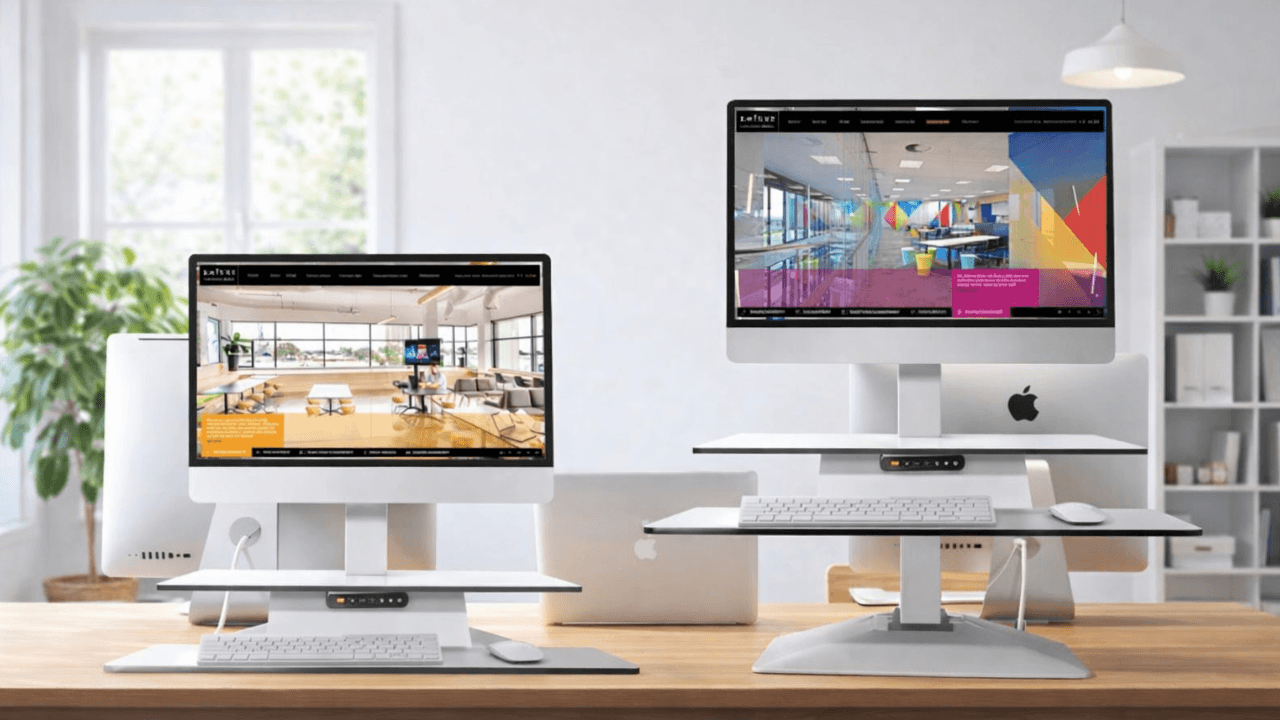
While a dedicated standing desk is always the best for alternating between sitting and standing, desk converters let you transform your fixed-height desk into an adjustable, ergonomic sit-stand desk.
If you're looking to turn your existing desk into an ergonomic sit-stand workstation, the Standesk Pro Memory Desk Converter outshines its competition. Here's my first-hand experience.
At a Glance

Standesk Pro Memory Desk Converter stands out for one reason: it does the job well and looks good doing it.
The design is clean, modern, and practical and comes with a 5-year warranty and a 14-day return policy. Features include an anti-collision system, automatic sleep function, and two separate work surfaces; one for your monitor or laptop and another for your keyboard and mouse.
In daily use, the quiet height adjustment works smoothly, and the three memory presets make switching between sitting and standing easy. The monitor arm also adjusts easily for better viewing angles. Another plus is the safety-focused design, with no pinch points during movement.
That said, the converter is expensive, especially when compared to some full sit-stand desks. So while it's the standard in its niche, I only recommend it if you don't have space for a traditional sit-stand desk.
Standesk Pro: In-Depth Review

The Standesk Pro Desk Converter is built with a solid diecast aluminium frame and a compact desktop panel that is stronger and more durable. The materials feel premium and handle regular repositioning without showing wear quickly.
And for comfort and ergonomics, it has two separate work areas. The top surface is for your monitor or laptop. It supports up to 50 kg, which is enough capacity for two 27-inch monitors. The lower keyboard and mouse tray measures 80 x 30 cm and supports up to 5 kg.
The Memory Desk Converter is also impressively stable, with very little wobble even when moving. It adjusts from 10 to 54 cm, giving enough range to find a comfortable working height.
The lift speed is 4 cm per second, so it reaches full height in about 13 seconds. It also includes an anti-collision system for safety and an automatic standby function for better power efficiency.

Ease of use is another strong point. The memory function lets you save up to three height settings, so that you can switch to your preferred positions with one button on the control panel. That makes it quick and easy to move between sitting and standing without constant readjustment.
The Standesk Pro Memory Desk Converter is a good fit if you need a workstation that you can easily move. It is simple to reposition at home or between workspaces with little effort. The touch controls, placed between the two work surfaces, make height adjustment quick and easy.
And for the warranty and return policy, you get a 5-year warranty, so you can rest assured that your purchase is protected for years to come. If, for some reason, you're not completely satisfied, you can return it within 14 days, offering an additional layer of buyer confidence.
Areas for Improvement
The Standesk Pro Memory Desk Converter performs well across the board, but the price is hard to ignore. It costs enough to compete with some full sit-stand desks, so it may not suit budget-conscious buyers.
Another limitation is size. It only comes in one desktop size, which may not work well for every setup. More size options would make it a better fit for a wider range of desks and users. Although in that scenario, you are better off getting a traditional standing desk.
The Competition
Having sized up the Standesk Pro Memory Desk Converter, let's now turn our attention to some alternatives. For a thorough overview of what's available to extend your existing desktop, I have a comprehensive guide on the best standing desk converters in Australia.
VIVO Standing Desk Converter
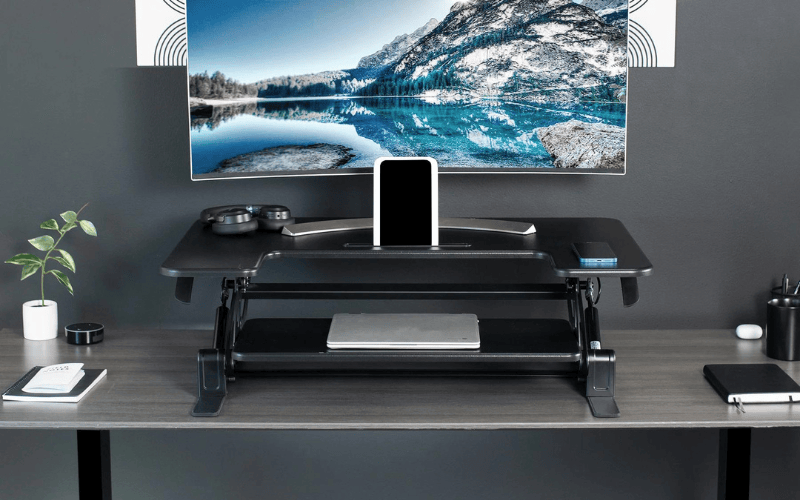
Vivo’s 32-inch standing desk converter is a strong, budget-friendly option. It offers a 31.5 x 15.7-inch work surface with enough room for two monitors, plus a 31.3 x 11.8-inch keyboard tray to keep the setup organised.
It adjusts from 11.4 to 50 cm, which gives decent flexibility, especially for taller users. Compared with the Standesk Pro, though, it falls short in a few areas. Standesk offers a wider height range of 10 to 54 cm, a much higher 50 kg weight capacity, and memory presets for saved positions. Vivo has a lower load capacity and does not include preset height settings.
Artiss Standing Desk

The Artiss Standing Desk is a better pick for anyone who wants a full adjustable desk on a budget, rather than a desk converter.
Standesk matches it on convenience, with up to three memory presets, and it offers stronger after-sales support through a 14-day trial and a 5-year warranty. Artiss only comes with a 1-year warranty and no trial period.
That said, Artiss offers better value overall. It supports up to 100 kg, double the Standesk Pro’s 50 kg capacity, while giving you a complete sit-stand desk instead of just a converter.
Frequently Asked Questions (FAQs)
Here are some frequently asked questions about the Standesk Pro Memory Desk Converter.
How to adjust the height of the Standesk Pro Desk Converter?
Use the up and down buttons on the front control panel to set the exact height, shown on the digital display. The electric motor lifts or lowers the desk quickly and smoothly.
To save a preferred height, press one of the three memory preset buttons on the handset. Once saved, the desk converter can return to that position instantly whenever needed.
How do I set the preferred heights of the Standesk Pro Desk Converter in the Memory?
The handset has six touch buttons: up, down, three memory buttons, and one memory set button. To save a height, adjust the desk to your preferred position, press the memory set button, then press one of the three memory buttons. Repeat this process for the other presets so you can switch to saved heights instantly.
The Final Verdict
For most people, the smarter choice is a full electric sit-stand desk. It is a better long-term investment in comfort, productivity, and healthier work habits.
That said, the Standesk Pro Desk Converter is still my top pick among desk converters. It stands out for its solid build quality, backed by a 5-year warranty that gives real confidence in its durability. The 14-day return policy also shows strong customer support.





)
)